Stablecoin for Games
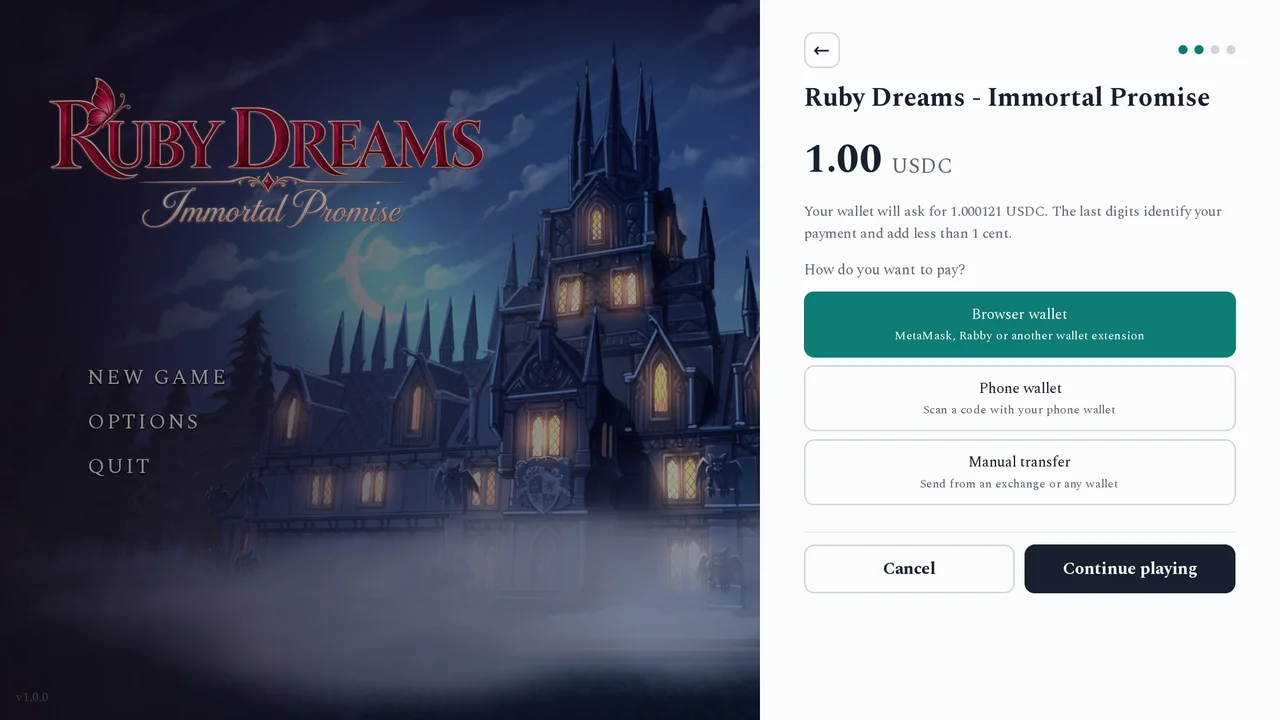
Stablecoin for Games (scfg in code) lets games take tips and sell unlocks in USDC and USDT on Ethereum,
Arbitrum, Polygon, Base, Arc or Solana. The player's wallet pays the developer's wallet directly. There is no
store, account or server in between. The game watches the blockchain itself and unlocks the item once the
payment is confirmed.
Engines
| Engine | What you add to your game | Status |
|---|---|---|
| Ren'Py 8.2+ | the scfg plugin (game/scfg/ and its Python core) | Released, desktop and web builds |
| Godot 4.3+ | the addons/scfg/ addon, pure GDScript | Preview: tested on Godot 4.3 and 4.7.2, desktop and web exports |
| Unity 6.3+ | the UPM package com.repulse.scfg, plain C# | Preview: tested on Unity 6000.6.9f1, Linux desktop (Mono and IL2CPP) and WebGL builds; runs on Windows; macOS supported, unverified |
| RPG Maker MZ | one plugin file, js/plugins/SCFG.js | Preview: tested on a stand-in for MZ, not yet in real RPG Maker MZ |
| Unreal Engine 5.6+ | the Scfg code plugin, C++ and Blueprint | Preview: tested on UE 5.8.4, Linux desktop builds; builds on Windows; macOS expected to work, not yet built or tested |
All five share one payment core, ported from the Ren'Py plugin's Python and checked against the same test vectors, so they pay, verify and restore the same way. The players' guide below fits all five engines. Mobile builds are best effort and unverified.
Players
- How paying works, step by step
- Which wallets work
- Restore a purchase on a new device
Developers
- Ren'Py: Install, Configure, API reference
- Godot: Install, API reference, the showcase project
- Unity: Install, API reference, the samples
- RPG Maker MZ: Install, API reference
- Unreal: Install, API reference, the showcase project
- Arc, where USDC also pays the network fee
- Security and limitations, for every engine
- Web builds: Ren'Py's HTML5 build and itch.io (Godot: Web exports, Unity: WebGL builds, RPG Maker MZ: Web deployment)
Unlocking a chapter in Ren'Py
init python:
    scfg.configure(wallet="0xYourWallet", testnet=True)
    scfg.add_item("chapter2", code=1, price="4.99", token="USDC", title="Chapter 2")

label end_of_chapter1:
    $ result = scfg.pay("unlock", item="chapter2")
    if scfg.owns("chapter2"):
        jump chapter2
The same in Godot (see the Godot install page):
Scfg.configure({"wallet": "0xYourWallet", "testnet": true})
Scfg.add_item("chapter2", {"code": 1, "price": "4.99", "token": "USDC", "title": "Chapter 2"})

var result := await Scfg.pay("unlock", {"item": "chapter2"})
if Scfg.owns("chapter2"):
    start_chapter_two()
And in Unity (see the Unity install page):
SCFG.Configure(new ScfgOptions { Wallet = "0xYourWallet", Testnet = true });
SCFG.AddItem("chapter2", new ScfgItem { Code = 1, Price = "4.99", Token = "USDC", Title = "Chapter 2" });

ScfgPaymentResult result = await SCFG.Pay(ScfgPayKind.Unlock, new ScfgPayRequest { Item = "chapter2" });
if (SCFG.Owns("chapter2"))
    StartChapterTwo();
In RPG Maker MZ it is a plugin command, SCFG > Unlock Item, with the item set up in the Plugin Manager (see the RPG Maker install page).
And in Unreal, in C++ (see the Unreal install page):
UScfgSubsystem* Scfg = GetGameInstance()->GetSubsystem<UScfgSubsystem>();   // null on a dedicated server
FScfgOptions Options;
Options.Wallet = TEXT("0xYourWallet");
Options.bTestnet = true;
Scfg->Configure(Options);
FScfgItem Item;
Item.Code = 1; Item.Price = TEXT("4.99"); Item.Token = TEXT("USDC"); Item.Title = TEXT("Chapter 2");
Scfg->AddItem(TEXT("chapter2"), Item);

FScfgPayRequest Request;
Request.Item = TEXT("chapter2");
Scfg->PayAsync(EScfgPayKind::Unlock, Request, [Scfg](const FScfgPaymentResult& Result)
{
    if (Scfg->Owns(TEXT("chapter2")))
        StartChapterTwo();
});